
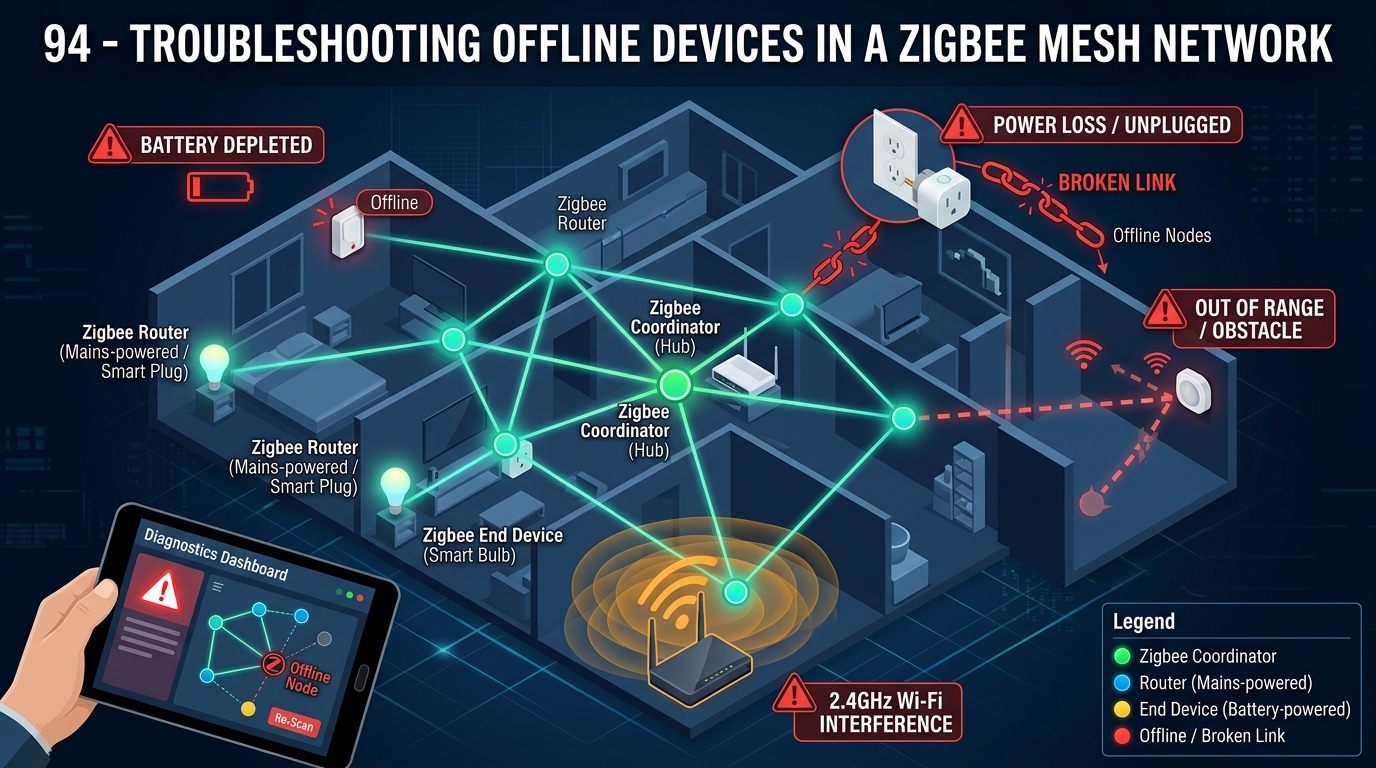

“Are you facing challenges with offline devices in your Zigbee mesh network? Troubleshooting these issues can be a daunting task, but fear not! In this post, we will guide you through effective strategies to diagnose and resolve connectivity problems in your network. Stay tuned to learn valuable insights that will help you ensure seamless operation of your Zigbee devices.”
Benefits of Using Zigbee Mesh Networks
Improved Reliability: One of the key benefits of Zigbee mesh networks is their self-healing capability. If one device fails or is removed from the network, the other devices can reroute messages through alternative paths, ensuring continuous connectivity. This redundancy greatly enhances the reliability of the network, making it ideal for applications where uninterrupted communication is crucial.
Low Power Consumption: Zigbee devices are designed to operate on low power, making them energy-efficient and suitable for battery-operated devices. The mesh network architecture allows devices to communicate with each other in a decentralized manner, reducing the need for constant communication with a central hub. This not only prolongs the battery life of individual devices but also contributes to overall energy savings in the network.
Troubleshooting Steps for Offline Devices
Identifying Offline Devices: When troubleshooting offline devices in a Zigbee mesh network, the first step is to identify which devices are experiencing connectivity issues. Utilize network management tools or check the central hub’s interface to pinpoint the offline devices.
Check Power Supply and Connectivity: Ensure that the offline devices have a stable power supply and are within range of neighboring nodes to maintain a strong network connection. Verify that there are no physical obstructions causing signal interference.

Common Issues in Zigbee Mesh Networks
Interference: One common issue in Zigbee mesh networks is interference from other wireless devices operating on the same frequency band. This interference can disrupt communication between devices, leading to packet loss and network instability. To mitigate interference, it’s essential to properly configure the Zigbee channels and avoid overlapping with other wireless networks in the vicinity.
Network Congestion: Another prevalent issue is network congestion, especially in larger Zigbee mesh networks with numerous devices. As the network grows, the increased traffic can overwhelm the network, causing delays in data transmission and reduced overall network performance. To address network congestion, network administrators can optimize the network layout, add more routers to distribute the traffic more evenly, and implement quality of service (QoS) mechanisms to prioritize critical data packets.
Tools for Monitoring Zigbee Mesh Networks
Network Monitoring Software
Network monitoring software is essential for keeping track of the health and performance of your Zigbee mesh network. These tools provide real-time insights into network traffic, device connectivity, and potential issues. By monitoring key metrics such as signal strength, data throughput, and packet loss, network administrators can proactively identify and address issues before they impact the network’s functionality.
Packet Sniffers
Packet sniffers are valuable tools for analyzing the data packets flowing through your Zigbee mesh network. These tools capture and display network traffic, allowing you to troubleshoot communication issues, identify potential security threats, and optimize network performance. By examining packet headers and payloads, network administrators can gain a deeper understanding of how devices communicate within the network and detect any anomalies that may require attention.
Best Practices for Maintaining a Zigbee Mesh Network
Regular Network Monitoring: One of the best practices for maintaining a Zigbee mesh network is to regularly monitor the network performance and health. By using network monitoring tools, you can proactively identify any issues or potential bottlenecks in the network. Monitoring can help in detecting and resolving problems before they escalate, ensuring smooth operation of the network.
Proper Placement of Devices: Another important practice is to ensure proper placement of devices within the network. Zigbee devices communicate with each other through intermediate nodes, so it’s essential to strategically position devices to optimize the network coverage and connectivity. By placing devices in optimal locations, you can enhance network reliability and performance.
Zigbee mesh networks offer a reliable and efficient solution for connecting devices in a smart home or industrial setting. Through their self-healing and self-organizing capabilities, Zigbee networks can provide seamless connectivity and communication among devices, enhancing overall system performance and user experience.
In conclusion, the benefits of using Zigbee mesh networks outweigh common issues and challenges that may arise during deployment. By following best practices for maintenance and monitoring, users can ensure the stability and longevity of their Zigbee network. Troubleshooting steps can help address offline devices promptly, minimizing disruptions in connectivity. Overall, Zigbee mesh networks present a cost-effective and scalable option for building robust IoT ecosystems.